Wheel Color Picker Plugin for jQuery
====================================
The Wheel Color Picker plugin adds color picker functionality to HTML form inputs in round color wheel style. The Wheel Color Picker can be displayed as a popup dialog as users focus the input, or embedded inline. It currently supports these HTML elements:
* input (works on buttons too!)
* textarea
Note: It should also works on other HTML elements which support jQuery .val() function.
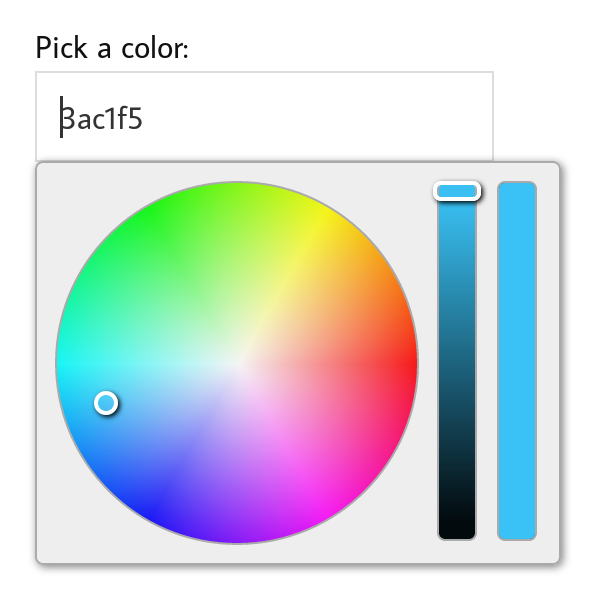
Features
--------
**SUPPORTED COLORS**
This plugin supports both RGB and HSV modes with additional Alpha channel.
**MULTIPLE FORMAT**
There are numbers of formats which the color picker can display its value:
* **hex** format, e.g. ffffff
* **css** format, e.g. #ffffff
* **rgb** format, e.g. rgb(255, 255, 255)
* **hsv** format, e.g. hsv(1.0, 1.0, 1.0)
**INDIVIDUAL SLIDERS**
The color picker can be set to display slider for each individual color channel.
**THEMING CAPABILITY**
The color picker appearance can be customized using CSS. This package already contains two CSS variants which can be used as starting point to make your own theme.
**RESPONSIVE MOBILE LAYOUT**
The color picker can automatically adapt when opened on mobile browsers with limited screen width.
See [Features Page](https://github.com/fujaru/jquery-wheelcolorpicker/wiki/Features) for the complete list.
Usage
-----
First, include these javascript and CSS files on the HTML head section:
```html
```
**HTML WAY**
Simply add `data-wheelcolorpicker` attribute to an input element.
```html
```
And you're done!
**JAVASCRIPT WAY**
Or you can also initialize the color picker to an element by calling:
```js
$(element).wheelColorPicker( options );
```
**Example**
```html
```
Demo
----
See `demo/index.html` for more usage examples or try it online at our [demonstration page](http://files.jar2.net/jquery/wheelcolorpicker/example-v3/example.html).
Documentation
-------------
See [Documentation Page](https://github.com/fujaru/jquery-wheelcolorpicker/wiki) for a complete documentation.
License
-------
jQuery Wheel Color Picker plugin is released under [MIT License](http://opensource.org/licenses/MIT).
What's New in 3.0
-----------------
* Code refactor
* Support for responsive/mobile websites
* Options for sliders arrangement
* Programmatically resizeable color picker
* External images no longer required
Read more about what's new at [Documentation Page](https://github.com/fujaru/jquery-wheelcolorpicker/wiki/v3:What's-New)
Backward Compatibility
----------------------
**Version 2**
Websites built using version 2 of the wheel color picker plugin can be upgraded
to version 3 with no changes necessary.
However, CSS customizations made from version 2 may not be compatible with
version 3 due to changes on HTML structure.
Please see [Documentation Page](https://github.com/fujaru/jquery-wheelcolorpicker/wiki/v3:Migration-from-v2)
for migrating instructions from version 2 to version 3.
**Version 1.x**
`alpha` option and `color` method marked as *deprecated* in version 2.x are now obsolete.
CSS is not backward compatible. Switching back to base theme is recommended.